
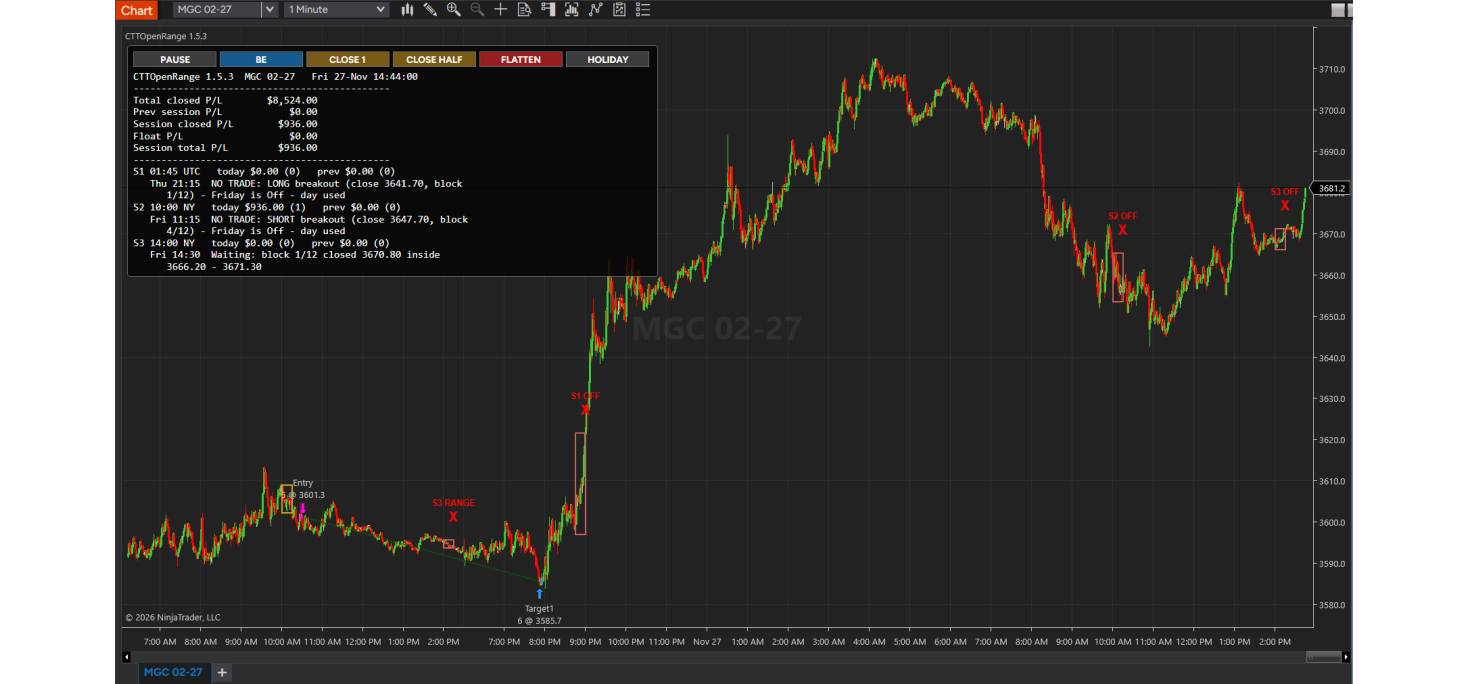
CTTOpenRange – Multi-Session Opening Range Breakout Strategy
CTTOpenRange is an automated opening range breakout strategy for NinjaTrader 8. It trades up to three sessions a day. Each session marks a price range at a fixed time and waits for a 15-minute close outside it. Then it enters in the direction of the break, with the stop at the other side of the range and the target set by your reward-to-risk ratio. Position size comes from your dollar risk, so every trade risks the same amount no matter how wide the range is. Every decision is shown on a clear panel on your chart, so you always know what each session is doing and why.
It is built for futures traders who want a simple, rules-based breakout with real risk controls: fixed dollar risk per trade, daily limits, per-session filters and protection for prop firm accounts.
We run CTTOpenRange on a live account and publish every trade, winning and losing, on our trading dashboard. It shows the equity curve, daily P&L, trade list and drawdown, and you can switch the period to see how it has done over time.
Live accounts running CTTOpenRange
All time| Account | Status | Trades | Win % | Net P&L | Profit factor | Max DD | Last trade |
|---|---|---|---|---|---|---|---|
| TDTEQI41075833 | Eval | 19 | 73.7% | +$1,338.50 | 2.27 | -$595.50 | Nov 26, 2026 |
Closed trades, net of commission. Blown and stopped accounts stay on the list. Past results are not a guarantee of future results.
View the live performance dashboard →
Live results reflect one account, one instrument set and the settings in use at the time. They are not a guarantee of future results.
How it trades
- Three independent sessions. S1, S2 and S3 each have their own anchor time, clock (New York, fixed GMT-5, Berlin or UTC), range length and trigger window, so you can trade the overnight, the European and the US opening ranges on the same chart.
- A clear stop and target. The stop sits at the opposite edge of the range. The target is your reward-to-risk ratio times the stop distance.
- Size from your dollar risk. The number of contracts comes from the risk you set and the stop distance. If even one contract would cost more than your risk, the session skips the trade. If the fill comes in worse than the signal, the size is trimmed back to your risk.
- Per-session presets and range filter. Each session has its own minimum and maximum range width, so ranges that are too tight or too wild are skipped.
- Weekday rules per session. For each day of the week, set a session to trade both sides, long only, short only or not at all.
- Inverse mode. Any session can trade the opposite side of the breakout with the same stop and target distances, for markets where breakouts tend to fail.
- Exit or reverse on an opposite close. Optionally close the trade, or reverse it once per day, when a block closes through the other side of the range.
- Forced flat time. All positions close at your end-of-day time.
Risk controls
- Fixed dollar risk per trade, with reward-to-risk targets
- Stop and target sent to the broker as an OCO bracket that rests at the exchange and still protects you if your connection drops
- Max daily loss and max daily profit, with a lockout until the next session (the daily profit goal helps with prop firm consistency rules)
- Pause after loss: stop a session from trading after a losing trade in another session
- Volatility regime filter: trade each direction only in the volatility conditions you choose
- Only one session trades at a time, so the sessions never stack risk against each other
- Account desync guard: detects when your broker or prop firm closes your position and stops the strategy from trading a position that no longer exists
- Built-in order safety: broker rejection handling that keeps the strategy running, order watchdogs and orphan order protection
See exactly why it trades – or doesn't
The on-chart panel shows each session's range, status and the one reason a trade was not sent (range too wide, size zero, weekday rule, daily limit, pause, volatility). It also shows today's and the previous session's P/L for each session, plus total and open P/L. When a filter blocks a session, the range box is marked on the chart with a short reason label, so you can review any day at a glance.
PAUSE, BREAKEVEN, CLOSE 1, CLOSE HALF and FLATTEN buttons give you full manual control at any time.
Built for prop firm traders
Run it on micro contracts (MNQ, MGC) to keep each trade inside evaluation drawdown rules. Because size comes from your dollar risk, the same settings work on any account size: just change the risk per trade. The Trader's Manual explains each setting and which protections to keep switched on for prop accounts.
What you get
- CTTOpenRange strategy for NinjaTrader 8 (version 2.x)
- Settings templates for MNQ and MGC
- The Trader's Manual (PDF), written for new, experienced and prop firm traders
- Updates for the current version
- E-mail support at info@ctrading.tools
Requirements
- NinjaTrader 8 (desktop) with a live or simulated data feed
- Futures instruments; micros recommended for prop firm accounts
- Internet connection when the strategy starts (licence check)
- License activation: send your NinjaTrader Machine ID after purchase
Risk disclosure
Futures trading involves substantial risk of loss and is not suitable for every investor. Losses can exceed your initial margin. Live and hypothetical results shown on this page or on the performance dashboard are not a guarantee of future results.
CTTOpenRange – Opening Range Breakout Strategy - 1 Year License
- Brand: NinjaTrader 8
- Product Code: CTTOpenRange
- Availability: In Stock
-
$3,990.00
Tags: NinjaTrader 8, Opening Range Breakout, ORB, Automated Strategy, Futures, MNQ, MGC, Micro Futures, Prop Firm