
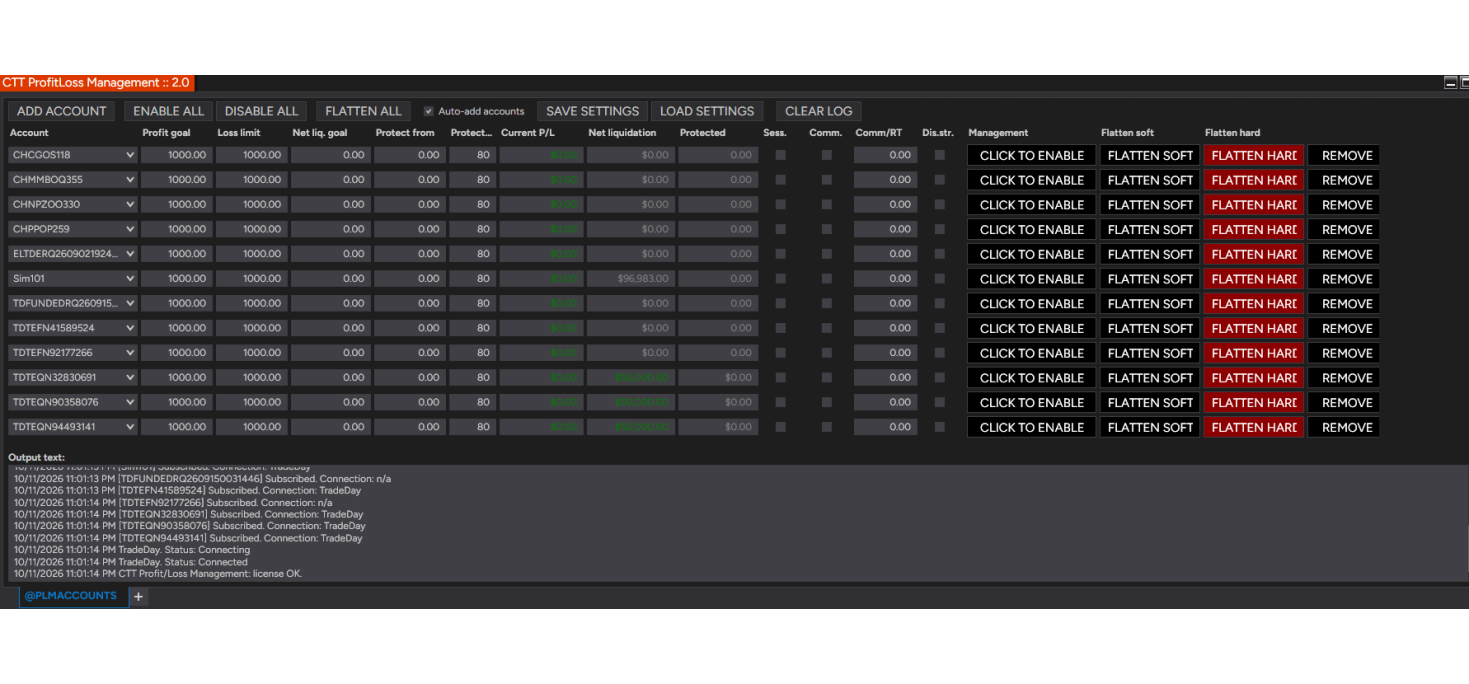
CTT Profit/Loss Management – Daily Limits and Account Protection for NinjaTrader 8
CTT Profit/Loss Management watches your NinjaTrader 8 accounts and closes everything out the moment a profit goal, a loss limit or a balance target is reached. It is the referee that stops the day when you said the day should stop – whether you trade by hand, run automated strategies, or both.
Several accounts are managed side by side in one window, one row per account, each with its own limits. Prop firm traders use it to stay inside daily loss rules and to bank a good day before giving it back.
What it does
- Profit goal – closes everything once the account has made a set amount.
- Loss limit – closes everything once the account has lost a set amount.
- Net liquidation goal – closes everything when the account balance reaches a target, for example your evaluation target.
- Profit protection – once you are up a set amount, locks in a percentage of the best profit of the day and closes out if you give it back.
- Strategy shutdown – optionally stops every running strategy on the account before closing, so nothing re-enters after the close-out.
- Flatten buttons – close any account by hand at any time, soft (through the strategies) or hard (immediately).
Built for the way prop accounts really count
- Whole-session P/L – limits can be measured on everything closed today plus whatever is still open, across every strategy and manual trade on the account. A $900 goal means $900 made today, however many trades it took.
- Its own daily P/L, not the broker's total – today's P/L is calculated from today's fills, because some prop connections report a running total since the account opened.
- Commissions included – limits can be measured net of commissions and fees. Enter your cost per round turn when your connection reports zero commission, as many prop connections do.
- Automatic daily reset at 5:00 PM: realized P/L, protection and fired limits start fresh every trading day without re-arming.
Safe by design
- Restoring a workspace or loading saved settings never arms a row on its own, so an old limit can never flatten a live account by surprise.
- One account can only be managed by one row, so two rows can never close the same account at once.
- Every close-out is explained in the log and in a pop-up: which limit fired and at what P/L.
- Settings for all accounts are saved to a file and loaded back in one click.
Requirements
- NinjaTrader 8 (any license type; works with live, prop firm and simulation accounts).
- Windows PC with an internet connection for the license check.
- License tied to your computer's NinjaTrader Machine ID.
What you get
- The CTT Profit/Loss Management add-on (NinjaScript import file).
- The Trader's Manual (PDF), with setup steps and prop firm recipes.
- Updates for the current version.
Risk disclosure: Futures trading involves substantial risk of loss and is not suitable for every investor. CTT Profit/Loss Management closes positions using market orders, which can fill beyond the trigger level in fast markets, so set your limits inside your firm's rules rather than on them. It manages orders and positions placed by you or your strategies and does not guarantee any result. You remain responsible for every trade on your account.
CTTProfitLossManagement – Daily Limits for NinjaTrader 8 - 1 Year License
- Brand: NinjaTrader 8
- Product Code: CTTProfitLossManagement
- Availability: In Stock
-
$320.00
Tags: NinjaTrader 8, Add-on, Risk Management, Daily Loss Limit, Prop Firm, Futures