
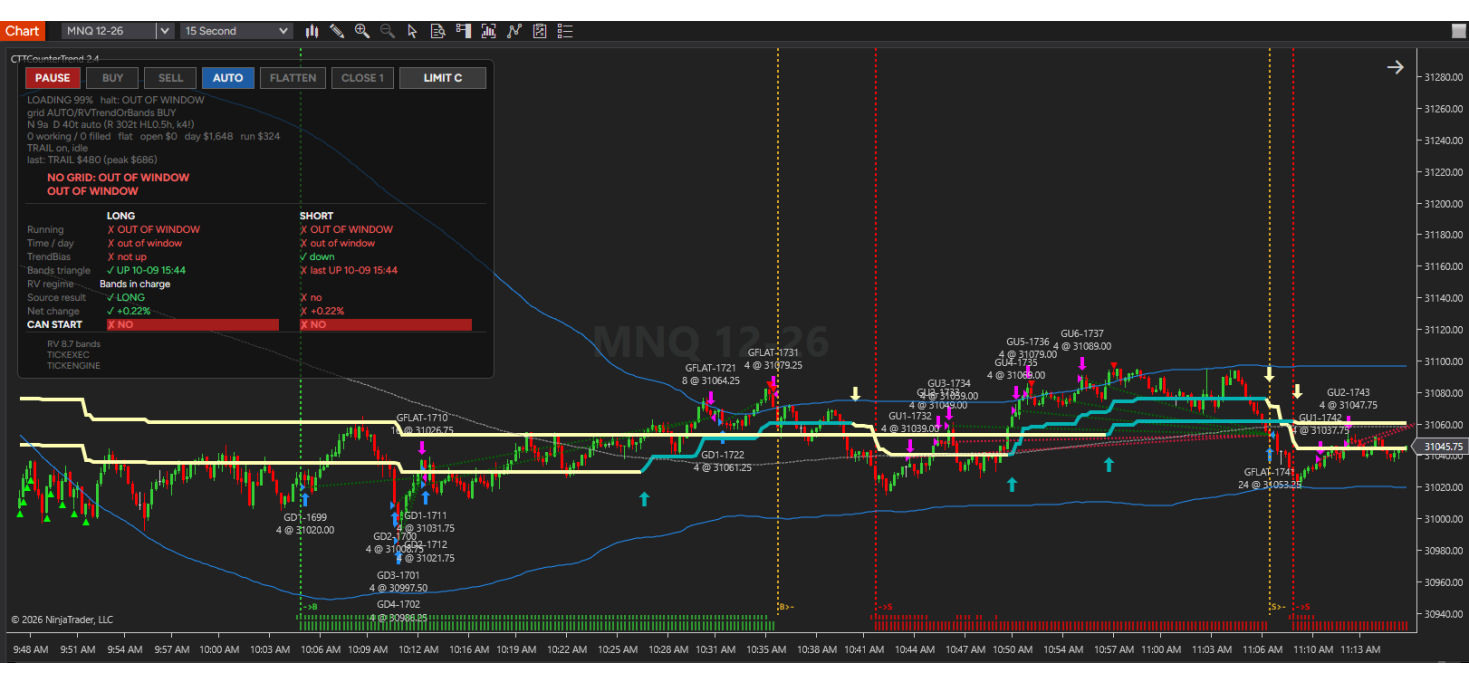
CTTCounterTrend – Automated Grid Strategy for NinjaTrader 8
CTTCounterTrend is an automated grid strategy for NinjaTrader 8. It places a ladder of pending orders around the price, lets them fill as the market moves back and forth, and takes a small profit each time the position reaches your target. Then it restocks the ladder and starts again. Every decision is shown on a clear panel on your chart, so you always know what the grid is doing and why.
It is built for futures traders who want a disciplined, rules-based grid with real risk controls: a dollar stop on every cycle, daily limits, trading-hour filters and protection for prop firm accounts.
Live performance – see every trade
We run CTTRenkoTrade on a live account and publish every trade, winning and losing, on our trading dashboard. It shows the equity curve, daily P&L, trade list and drawdown, and you can switch the period to see how it has done over time.
View the live performance dashboard →
Live results reflect one account, one instrument set and the settings in use at the time. They are not a guarantee of future results.
How it trades
- A one-direction ladder. All rungs are buys or all are sells, never both. The position builds as price moves, and the whole position is closed at your profit target, trailing stop or stop loss.
- Automatic or manual direction. Choose BUY or SELL yourself, or press AUTO: a Bollinger band signal fades stretched markets, a stepped trend line follows trending ones, and optional modes let market volatility or the shape of the day choose between them.
- Spacing that adapts to the market. The distance between rungs is worked out from the recent range, so a quiet market gets a tight ladder and a busy one gets a wide ladder. When the market is too quiet or too wild for your target, the strategy simply sits out.
- Three grid types. Limits only, stops only, or both – set separately for counter-trend and with-trend grids.
- Cycle after cycle. After each exit, the used rungs go back on the ladder, or the ladder is rebuilt around the current price when it has drifted away.
Risk controls
- Profit target and stop loss per cycle, in dollars
- Optional ATM-style trailing stop, sized in dollars or in grid rungs
- Protective stop that rests at the exchange and still protects you if your connection drops
- De-risk: trims the deepest rungs one at a time when price runs against the grid
- Max daily loss and max daily profit, with a lockout until the next session
- Session risk: stop building new grids after a run of losing cycles
- Up to four trading windows, four no-trade windows, weekday switches and a daily close time
- Account desync guard: detects when your broker or prop firm closes your position and stops the strategy from trading a position that no longer exists
- Built-in order safety: hourly order budget, broker connection check, rejection latch and orphan order sweep
Optional filters for experienced traders
- Realized volatility – trade each side only in the volatility regime you choose, measured on your own instrument
- Session net change – buy or sell only once the session has moved a set percent from its open
- Market Profile – avoid fading trend days, using day type, trend score and value area levels
- Economic news – stand aside, or close, around high-impact releases from the ForexFactory calendar
See exactly why it trades – or doesn't
The on-chart panel shows every filter's verdict for longs and shorts side by side, the position, open and daily profit, and one line naming what is stopping a new grid right now. RUN, PAUSE, BUY, SELL, AUTO, FLATTEN, CLOSE 1 and grid-type buttons give you full manual control at any time.
Built for prop firm traders
Run it on micro contracts (MNQ, MES, MYM, M2K) to keep each rung small enough for evaluation drawdown rules. The Trader's Manual explains how to convert settings from minis to micros, and which protections to keep switched on for prop accounts.
Honest backtesting tools
Tick-accurate execution in the Strategy Analyzer, a tick engine that makes backtests and Market Replay make the same decisions, a start anchor to line up backtests with live runs, and per-session summaries of why no grid was built.
What you get
- CTTCounterTrend strategy for NinjaTrader 8 (version 2.4)
- The four helper indicators it uses, in the same package
- The Trader's Manual (Word), written for new, experienced and prop firm traders
- Updates for the current version
- E-mail support at info@ctrading.tools
Requirements
- NinjaTrader 8 (desktop) with a live or simulated data feed
- Futures instruments; micros recommended for prop firm accounts
- Internet connection when the strategy starts (licence check)
- Licence activation: send your NinjaTrader Machine ID after purchase
Risk disclosure
Trading futures involves substantial risk of loss and is not suitable for every investor. Grid strategies add to a position while it is losing, so losses can grow faster than profits and can exceed your initial margin. CTTCounterTrend is a software tool, not investment advice; you remain responsible for every order it places in your account. Always test on a simulated account first. Past performance, whether live, backtested or simulated, is not indicative of future results. Hypothetical or simulated performance results have certain limitations: they do not represent actual trading and may under- or over-compensate for factors such as lack of liquidity.
CTTCounterTrend – Automated Grid Strategy - 1 Year License
- Brand: NinjaTrader 8
- Product Code: CTTCounterTrend
- Availability: In Stock
-
$2,900.00
Tags: NinjaTrader 8, Grid Trading, Strategy, Automated Trading, Prop Firm, Futures, Micro Futures